(01)Internal tools / B2B UX
Order Intake Console
Making spreadsheet-based
order intake easier to navigate
I designed the original file-import workflow for a commercial internal tool. For this portfolio case study, I revisited it through an anonymized redesign focused on clearer validation feedback, processing visibility, and actionable system states.

(02)The challenge
A file upload is
only the beginning.
Anonymized commercial project · Portfolio redesign
My role
I designed the original commercial file-import user flow. For this case study, I redesigned the experience, refined the visual hierarchy, and explored additional system states.
User flow
- Manual Intake Queue
- Choose file
- Check content
- Validation passed?
Yes · passed
- Import
- Processing
- Completed
No · failed
- Review issues
- Correct source file
- Upload corrected file
- Check content again
Optional
- Save as Action required
How the redesigned flow takes a file from upload to completion, including the correction path.
Optional: Save the submission with an Action required status while validation issues remain. Import stays blocked until validation passes.
(03)Design decision 01
Breaking a complex task into
clear steps
The upload process separates file selection from content validation. This helps users understand requirements before proceeding and review the result before importing records.
- 1File requirements link available before submission
- 2Validation feedback before import
Step 1 · Choose file

Step 2 · Check content

Choose file → Check content → Ready to import. The actual two-step Upload file dialog, shown as focused crops.Focused crops of the actual two-step Upload file dialog.
Successful validation scenario — the file passes validation and is ready for import. The next section shows an alternative outcome, not a continuation of this file.
(04)Design decision 02
Making validation errors actionable
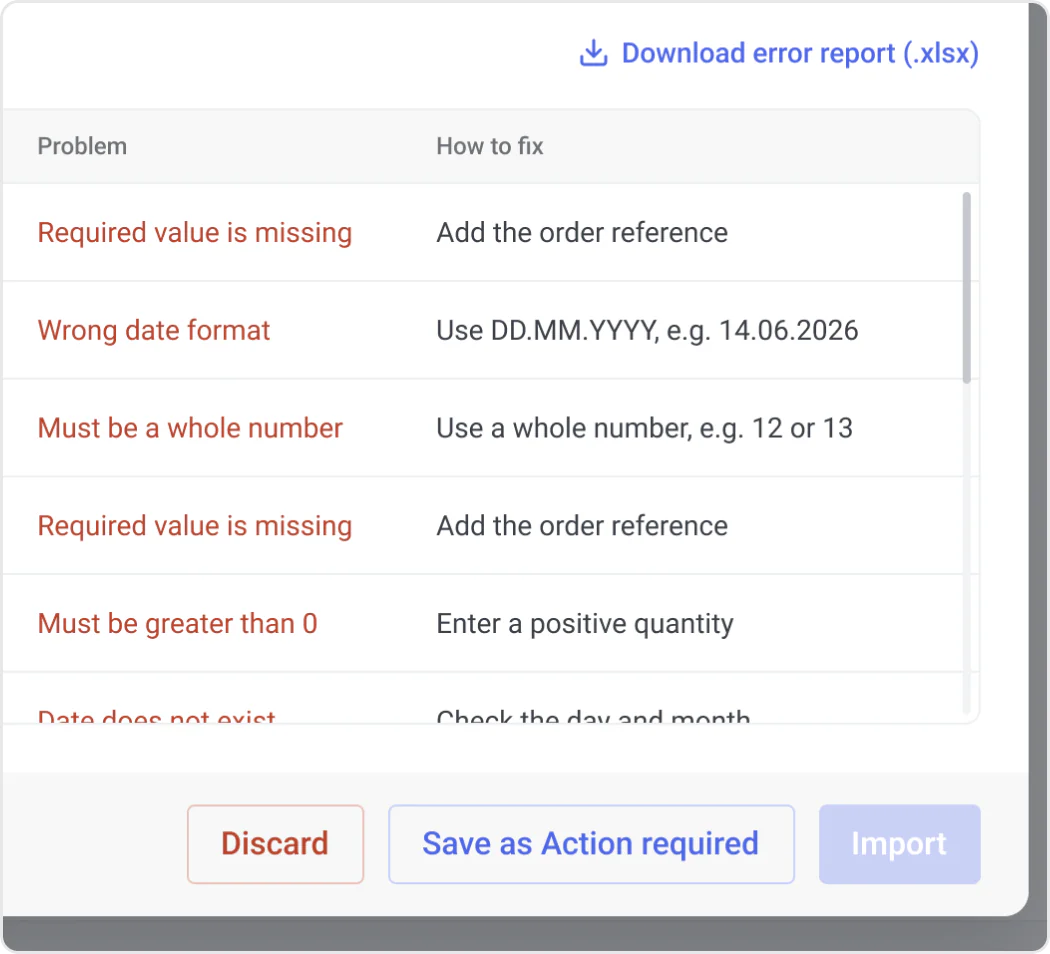
Rather than leaving users with a generic error message, the interface identifies affected rows, explains the problem, and provides guidance for correcting the source file.
Import is blocked while validation errors remain unresolved.
- 1Specific row-level feedback
- 2Actionable correction guidance
- 3Prevention of invalid imports

(05)System states
Clear feedback
at every stage
INT-1041, INT-1040 and INT-1042 are three different demo submissions. They illustrate possible system states, not one file moving through a timeline.
State A · INT-1041
Action required

12 of 920 rows need correction. Although 908 rows passed validation, the entire submission remains blocked until the source file is corrected and checked again.
State B · INT-1040
Processing

Progress feedback makes ongoing processing visible without suggesting that the import has already finished.
State C · INT-1042
Completed

Completed submissions provide confirmation, record counts, and an activity history.
(06)Outcome
A clearer path from
upload to resolution
The redesigned prototype brings the experience together across file selection, validation, error handling, processing feedback, and submission details.
It demonstrates a structured approach to designing complex internal workflows with clearer feedback and actionable system states.
What this project reinforced
Complex internal tools need more than clean interfaces. Clear system feedback, understandable errors, and visible next steps are essential to designing workflows users can navigate confidently.
(07)More work